Posting data
Send data to Emoncms from your own scripts, devices or other software, such as Node-RED or Home Assistant. Use the HTTP input API, MQTT or encrypted HTTP input.
For the full input API, click API Help on the Inputs page.
HTTP input API
API key
Scripts and devices authenticate with the Read & Write API Key. Find it on the My Account page or the input API help page.
The examples below use emonpi.local as the host and APIKEY in place of your key.
Send a test value
Paste this into a browser address bar:
http://emonpi.local/input/post?node=mynode&fulljson={"power1":100,"power2":200,"power3":300}&apikey=APIKEY
Emoncms returns {"success": true}. The inputs appear under the node mynode on the Inputs page.
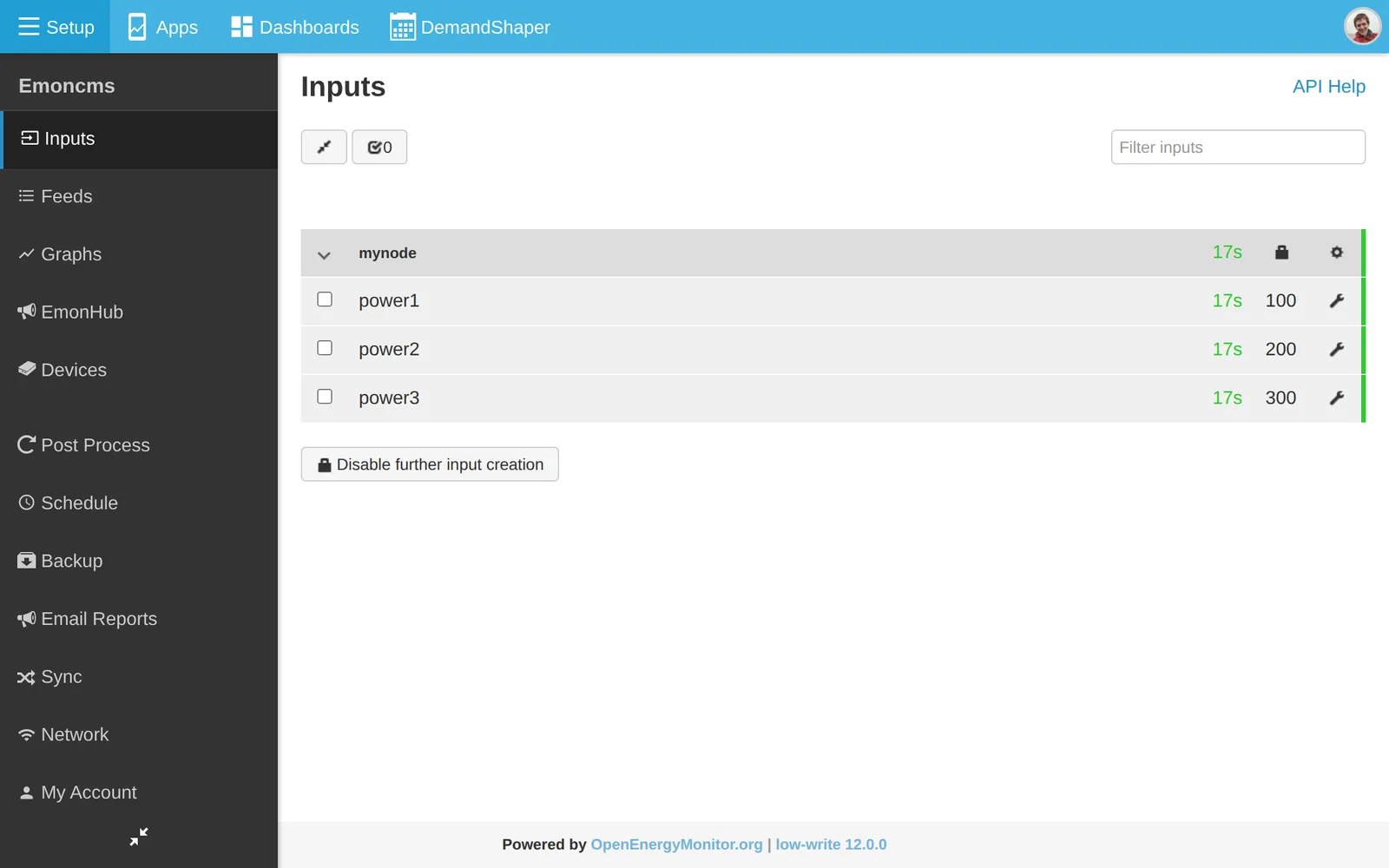
To record the inputs, add input processing. See Inputs.
Send the key in a header
Keeping the key out of the URL stops it appearing in server logs:
curl -H "Authorization: Bearer APIKEY" \
  "http://emonpi.local/input/post?node=mynode&fulljson={\"power1\":100}"
Use POST
All parameters can go in the POST body:
curl -X POST http://emonpi.local/input/post \
  -H "Authorization: Bearer APIKEY" \
  -d 'node=mynode&fulljson={"power1":100,"power2":200}'
CSV values
Values without names are numbered from 1:
http://emonpi.local/input/post?node=mynode&csv=100,200,300&apikey=APIKEY
Set the time
Add a Unix timestamp to set the input time:
http://emonpi.local/input/post?time=1581112821&node=mynode&csv=100,200,300&apikey=APIKEY
Bulk upload
input/bulk sends many readings from several nodes in one request. Use it for historic data or buffered readings. See the input API help page.
MQTT
MQTT is a messaging protocol. On the emonPi and emonBase it passes data between emonHub, Emoncms and other software.
Server
The emonPi and emonBase run a Mosquitto MQTT server on port 1883. Find the username and password on the emonSD download page.
Any MQTT client can connect to the emonPi or emonBase IP address on port 1883, for example MQTT Explorer on a computer, or an MQTT app on a phone.
Topics
Emoncms uses the base topic emon/. Each value has its own topic:
emon/<node>/<key>
For example, emon/emonpi/power1 is input power1 of node emonpi. Publish a value to a topic under emon/ and it appears as an input on the Inputs page.
The base topic is set in /etc/emonhub/emonhub.conf and in the [mqtt] section of /var/www/emoncms/settings.ini.
Test from the command line
Install the Mosquitto clients:
sudo apt install -y mosquitto-clients
The examples below use USER and PASS in place of the MQTT credentials. Add -h <host> to connect to another machine.
Publish a test value:
mosquitto_pub -u USER -P PASS -t 'emon/test/power1' -m '100'
Show all Emoncms messages. # is a wildcard:
mosquitto_sub -v -u USER -P PASS -t 'emon/#'
Show messages for one node:
mosquitto_sub -v -u USER -P PASS -t 'emon/emonpi/#'
Services
Service |
Role |
Restart |
Log |
|---|---|---|---|
emonHub |
Decodes data from the emonPi, the emonBase radio and other interfacers. Publishes each value to |
|
Setup > EmonHub, or |
emoncms_mqtt |
Subscribes to |
|
Setup > Admin > Emoncms Log, or |
emonPiLCD |
Subscribes to the emonHub topics to show live values on the emonPi display. |
|
|
The emonHub log shows every value published to MQTT.
To publish from Emoncms to another topic, for example house/power/solar, add the Publish to MQTT via Redis input process and enter the topic in the process text box.
Encrypted input
Devices that cannot use HTTPS can encrypt the data they post to input/post and input/bulk. The write API key is the shared key. The API key itself is not sent.
Request
Method:
POSTtoinput/postorinput/bulk.Header
Content-Type: aes128cbc. Useaes128cbcgzwhen the request string is compressed with zlib (PHPgzcompress) before encryption. The HMAC and the response hash then cover the compressed data.Header
Authorization: USERID:HMAC, where HMAC is the SHA-256 HMAC of the plain request string, keyed with the hex decoded write API key.Body: base64 of the 16 byte IV followed by the AES-128-CBC ciphertext of the plain request string. The key is the write API key, hex decoded to 16 bytes. Use URL safe base64 with no padding.
The plain request string uses the same parameters as an unencrypted request, for example node=emontx&data=100,200,300.
Response
The response is the URL safe base64 SHA-256 hash of the plain request string. Compare it with your own hash to confirm that Emoncms received the data.
Steps
Build the request string, for example
node=emontx&data=100,200,300.Create a random 16 byte initialisation vector.
Encrypt the request string with AES-128-CBC.
Join the IV and the ciphertext and encode as base64.
Calculate the HMAC of the request string.
POST the encoded string with the two headers.
Check the returned hash.
PHP example
<?php

$userid = USERID;
$apikey = "WRITE APIKEY";

$data = "node=emontx&data=100,200,300";

// Encrypt data
$iv = openssl_random_pseudo_bytes(16);
$encryptedData = $iv.openssl_encrypt($data, 'AES-128-CBC', hex2bin($apikey), OPENSSL_RAW_DATA, $iv);
$base64EncryptedData = rtrim(strtr(base64_encode($encryptedData), '+/', '-_'), '=');

// Generate hmac_hash for user authorization
$hmac = hash_hmac('sha256',$data,hex2bin($apikey));

// Generate request
$ch = curl_init();
curl_setopt($ch,CURLOPT_URL,"http://localhost/emoncms/input/post");
curl_setopt($ch,CURLOPT_POST,1);

// Set request headers Authorization & Content-Type
curl_setopt($ch,CURLOPT_HTTPHEADER, array(
  "Authorization: $userid:$hmac",
  "Content-Type: aes128cbc"
));

curl_setopt($ch,CURLOPT_POSTFIELDS,$base64EncryptedData);
curl_setopt($ch,CURLOPT_RETURNTRANSFER,true);

$result = curl_exec($ch);
if (PHP_VERSION_ID < 80000) {
    curl_close($ch);
}

// Generate sha256 hash of data string to compare with returned sha256 hash result
$sha1 = str_replace(array('+','/'),array('-','_'), base64_encode(hash("sha256", $data, true)));

if ($sha1==$result) {
    print "ok";
} else {
    print $result;
}